PRODUCT SPECIFICATIONS
Guest Internet GIS-R2 Hotspot Gateway with Captive Portal
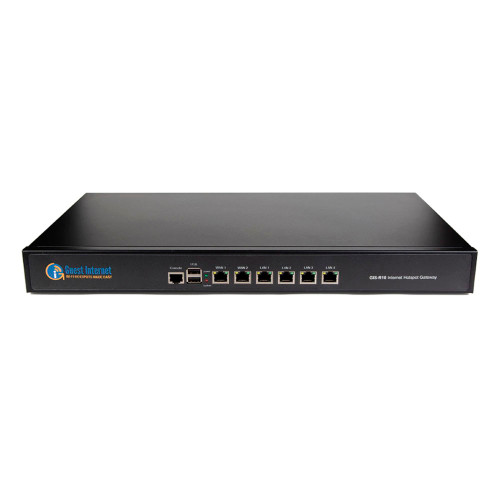
The Guest Internet GIS-R2 is an Ethernet hotspot gateway that manages Internet access for guests and visitors. Installed between your existing Internet router and guest network, it adds a customizable login page and tools for controlling how users access your connection.
Designed for hospitality, retail and other public-access networks, the GIS-R2 supports up to 100 Mbps gateway throughput. Separate wireless access points provide WiFi coverage, while the gateway manages guest authentication and access policies.
Key Features
- Customizable captive portal for business branding and guest login.
- Access-code, email registration, terms acceptance and open-access options.
- Per-user download and upload speed controls.
- Time and data limits for guest access.
- One Gigabit Ethernet WAN port and four Gigabit Ethernet LAN ports.
- Access-code database supporting 10,000 codes.
- Firewall and content-filtering features.
- Local administration and optional GIS Cloud management.
Guest Login and Access Management
Choose an access method that fits your business, from accepting terms and conditions to entering a pre-generated access code. Email registration can collect guest contact information, while customizable login pages provide space for your business identity and messaging.
Bandwidth and Usage Controls
Set upload and download limits per user to help distribute available Internet capacity. Time and data allowances let administrators define access policies for different guest requirements.
The manufacturer's throughput rating is up to 100 Mbps. Actual performance depends on traffic, network infrastructure and enabled gateway options; Gigabit Ethernet port speeds do not mean Gigabit hotspot throughput.
Connectivity and Installation
Connect the WAN port to your existing Internet router and connect guest-network equipment to the LAN ports. A browser-based setup wizard guides initial configuration.
The GIS-R2 requires a separate wireless access point to provide WiFi. Configure downstream access points in bridge mode according to the manufacturer's installation guidance.
Ideal Applications
- Motels and guest accommodation.
- Campground and RV park guest networks using separate access points.
- Gyms, convenience stores and retail locations.
- Libraries, medical offices and visitor Internet networks.
- Internet cafes using access codes or printed vouchers.
Compatible Products
The GIS-R2 works with external Ethernet-connected wireless access points. Guest Internet instructs installers to configure access points in bridge mode and enable WDS on range extenders or point-to-point bridges where applicable. Access-point power must be provided according to that device's own requirements.
- Guest Internet GIS-TP1 Access Code Ticket Printer – Explicitly supported for printing guest access-code tickets. Connects to the GIS gateway's LAN network through Ethernet and requires its own power supply. A separate computer or tablet controls ticket selection.
Important: The GIS-R2 does not provide built-in WiFi coverage. Do not assume its Ethernet ports can power an access point. Use the gateway's supplied power adapter and provide separate, correctly specified power for connected equipment. The ticket printer, access points and control computer or tablet are separate equipment.
Technical Specifications
General
- Brand: Guest Internet
- Model / MPN: GIS-R2
- Product Type: Ethernet hotspot gateway and guest Internet access controller
- Installation: Between an existing Internet router and guest-network equipment
Performance and Capacity
- Gateway Throughput: Up to 100 Mbps; depends on network infrastructure, traffic and enabled options
- Access-Code Database: 10,000 codes
- User Limit: No manufacturer-imposed user-count limit; practical capacity depends on traffic and configuration
Ethernet Interfaces
- Total Ethernet Ports: 5 RJ-45 ports
- WAN: 1 x Gigabit Ethernet RJ-45
- LAN: 4 x Gigabit Ethernet RJ-45, labeled LAN1–LAN4
- Wireless Access: Requires a separate wireless access point
Authentication and Guest Access
- Access Methods: Pre-generated access codes, email registration, terms acceptance and open access
- Portal Customization: Login-page generator, custom background image and HTML/CSS page upload
- Bandwidth Controls: Per-user upload and download speed limits
- Usage Controls: Time and data limits
Management and Security
- Configuration: Browser-based administration with setup wizard
- Remote Management: Optional GIS Cloud service
- Cloud Pricing Qualification: Free service available; some advanced features require payment
- Security Features: Firewall and content filtering
- PoS Integration: HTTP API for access-code management
Power
- Power Source: External power adapter
- Published Supply Specification: 12 V; 110 V/220 V supply, 24 W as listed by the manufacturer
- Installation Requirement: Use the power supply shipped with the unit
Physical Specifications and Environment
- Enclosure Dimensions: 220 x 135 x 30 mm
- Environment: Commercial, non-industrial installations
Included Parts and Warranty
- Confirmed Supplied Items: GIS-R2 gateway, power supply and Ethernet cable
- Manufacturer Warranty: 1 year for product defects
Download Guest Internet GIS-R2 Hotspot Gateway Datasheet (PDF)